Dense mode protocol
This protocol details an example of 1 drug combination. For more combinations, adjust according to your need.
See the Overview section for materials required.
1: Determine drug concentrations
Choose the desired drugs and their corresponding concentrations. Each drug will have 10 doses. As mentioned above, this example will detail how to screen one combination (2 drugs), but this can be adjusted according to experimental needs.
Start by choosing the maximum desired concentration of each drug. Check out the template below which takes the top chosen max concentration and makes a serial dilution according to the specified dilution factor:
You can customize this yourself by downloading a copy! File ➝ Download
The dilution factor is set to 1:3 by default (our recommendation), but this may be modified to anything (e.g. 1:2.5).
Check out the stock plate map (below the concentration ranges) for details on how this plate will look.
Stocks drugs must be soluble at 400X final desired concentrations.
2: Prepare the stock plate
Make the stock plate in a 384-well polypropylene (pp) plate that is Echo-compatible according to the following template:

(Use the spreadsheet template from step 1 to see details of how the plate should look).
All wells should contain 50 µL, which is enough to make 9 assay-ready plates.
Drug 1 in the top row, and Drug 2 in the bottom row
DMSO is plated in 4 wells to account for the ‘back-filling’ transfer steps
Staurosporine at a final concentration of (10 mM / 400 =) 25 µM is the cell death control
Ensure Staurosporine is an effective cell death control for your cell line before proceeding.
3: Prepare assay-ready plate
Use the stock plate to construct the assay-ready plate:
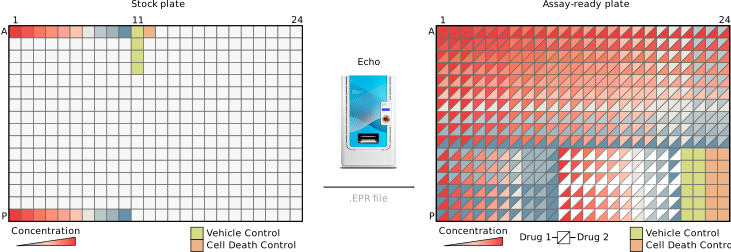
It’s called “assay-ready” because these plates are ready for cells to be added.
Once plates are made, they can be stored at -80 °C until ready for cells.
The Echo requires an .EPR file to perform the transfer
This file contains information on the source/destination wells, and volume to transfer.
The Combocat dense mode EPR file looks like this:
Download the EPR file from the combocat github and use it to make assay-ready plate:
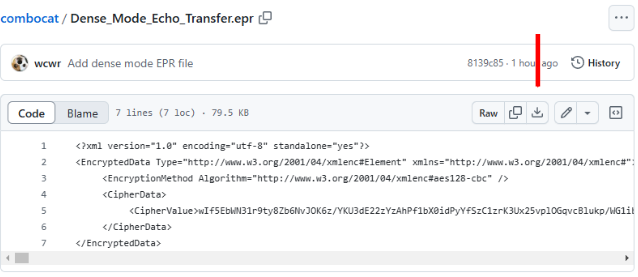
You can modify the spreadsheet and import it into the Echo software to make your own EPR file.
This Echo protocol can be used up to 9 times to make 9 assay-ready plate copies.
4: Plate cells & incubate
Plate 40 µL of cells into all wells.
- This is much easier with a liquid handler like the Multidrop Combi or similar, but can be achieved using multi-channel pipettes as well.
- Note that adding cells will bring the final DMSO concentration to 0.5% in all wells
Incubate cells for desired treatment time
We recommend 72-hour treatments. After 96-hours, evaporation of media begins to disrupt data quality.
5: Measure viability
The following steps are specific to CellTiter-Glo
Equilibrate plate(s) to room temperature
Add 25 µL prepared CTG reagent
- Important
While the manufacturer recommends a 1:1 ratio, Do NOT dispense more than 25 µL of reagent. The total well volume should not exceed 65 µL – otherwise there is a risk of overflow. 😵
- Adding CTG reagent with a liquid dispenser is helpful here (like with dispensing cells)
Centrifuge plates for ~4 minutes, ~260 RCF
Incubate at room temperature for 10 minutes
Read viability on luminometer
Collecting data
Collect the raw luminescent data and save it as a .CSV file.
This file should contain only 384-well format (16 rows by 24 columns) data, and nothing else. For example:
You can download this (File ➝ Download) to follow along. Be sure to choose .csv
Rename the file to CHP134_Rucaparib_AZD1390.csv so the filename matches!
- It is recommended to make a copy of your raw data and save a version containing only the required information, which will be used during the analysis.